
Every estimator knows the chaos of bid day. Proposals flood your inbox in different formats. Some are detailed PDFs, while others are just a few lines in an email. To make sense of it all, most general contractors turn to the tool they know best: Microsoft Excel.
Excel feels like a safe bet. It is flexible and familiar. You can build a bid leveling spreadsheet that looks exactly how you want it. But as projects get more complex, that flexibility becomes a liability. What starts as a simple comparison often turns into a "spreadsheet bonfire" of manual data entry, broken formulas, and missing scope.
In this guide, we will look at how to set up a bid comparison spreadsheet in Excel. We will also explore why relying on manual leveling is one of the biggest risks to your project budget and how AI is changing the game for Procore users.
How to set up a bid comparison spreadsheet in Excel
If you are still using spreadsheets to compare subcontractor bids, you need a structured approach to avoid total chaos. A good bid leveling template should allow you to see price differences and scope gaps side by side.
1. Create your columns and rows
Start by listing your scope items in the first column. These should match your bid package requirements. For a concrete package, this might include mobilization, formwork, reinforcement, and finishing.
Create a set of columns for each subcontractor. At a minimum, you need columns for: * Base Bid Price: The initial number provided by the vendor. * Alternates: Any optional pricing requested. * Exclusions: Items the subcontractor explicitly left out. * Adjustments: Your own notes or "plug" numbers to fill gaps.
2. Use formulas for normalization
The goal of bid leveling is to reach an "apples-to-apples" comparison. Use formulas to calculate the total adjusted price for each vendor. If Subcontractor A excluded the cleanup costs that Subcontractor B included, you must add a plug number to Subcontractor A’s total.
3. Organize by trade
Do not try to cram every trade into one tab. Create separate tabs for each bid package. This keeps your data clean and prevents your spreadsheet from becoming too slow to use.
The manual bid leveling process: Step by step
Setting up the template is only half the battle. The real work happens when the bids start coming in.
Extracting data from PDF proposals
Most subcontractors send their bids as PDFs. This means you have to manually type data from the PDF into your Excel sheet. This is the most time-consuming part of preconstruction. You are not just copying numbers. You have to hunt through pages of fine print to find what is included and what is not.
Normalizing line items
Once the data is in Excel, you have to normalize it. Subcontractors rarely use the same terminology. One might call it "site prep" while another calls it "earthwork." You have to manually align these items to ensure you are comparing the same scope of work.
Identifying scope gaps
This is where manual leveling gets dangerous. You have to spot what is not there. If a subcontractor forgets to include a specific tax or a required bond, it might not be obvious until you are deep into the project. Manual review requires a high level of focus that is hard to maintain when you are leveling ten different trades at once.
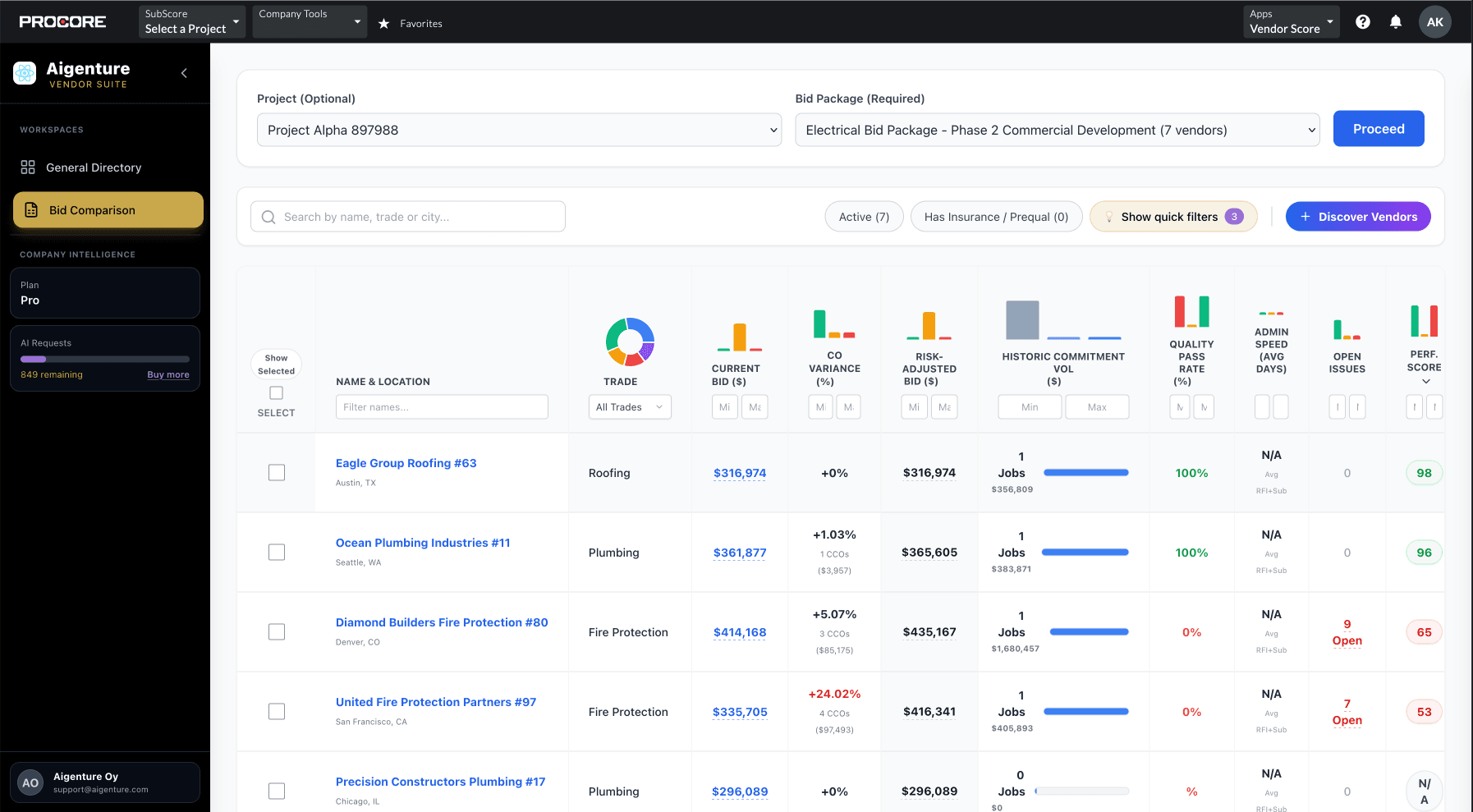
The hidden risks of using Excel for bid analysis
While Excel is a powerful tool, it was never designed for the high-stakes world of construction bidding.
Formula errors and broken links
A single typo in an Excel formula can throw off your entire estimate by thousands of dollars. Research by Panko (2008) found that roughly 88% of all spreadsheets contain errors. In a complex bid leveling sheet with hundreds of rows and multiple tabs, these errors are almost impossible to find.
Version control issues
When multiple estimators are working on the same project, version control becomes a nightmare. Is "Bid_Leveling_Final_v2.xlsx" really the latest version? If someone accidentally overwrites a cell or uses an old template, your entire award decision is based on bad data.
Manual entry fatigue
Estimators are human. After four hours of typing data from PDFs into a spreadsheet, your brain gets tired. You might miss a decimal point or skip a line item. These small mistakes lead to massive budget overruns once the contract is signed.
Why manual data entry is the enemy of accuracy
The time cost of manual entry is significant. Every hour you spend typing numbers is an hour you are not spent analyzing risk or finding better vendors.
As a recent industry report on Downtobid highlights, manual leveling often overlooks the "unwritten rules" of bidding. You might pick the lowest price on your spreadsheet, but if that subcontractor has a history of change orders, they are actually the more expensive choice. Excel cannot tell you that. It only sees the numbers you typed in.
Furthermore, manual spreadsheets are silos. The data you collect during bidding stays in that file. It does not help you on your next project. You lose the chance to track historical vendor performance or see pricing trends over time.
Moving from spreadsheets to AI-powered bid intelligence
The industry is moving away from the "spreadsheet bonfire." Modern preconstruction teams are using AI to automate the tedious parts of bid leveling.
Instead of manual entry, AI can scan a PDF proposal and extract the data instantly. It identifies scope items, exclusions, and pricing without you having to type a single word. This does more than just save time. It provides real-time risk detection that Excel simply cannot offer.
AI can flag a bid that is "too good to be true" by comparing it to other bids in the same package. It can spot missing scope items by checking the proposal against your project requirements. This allows you to make data-driven decisions based on facts, not just the numbers that made it into your spreadsheet.
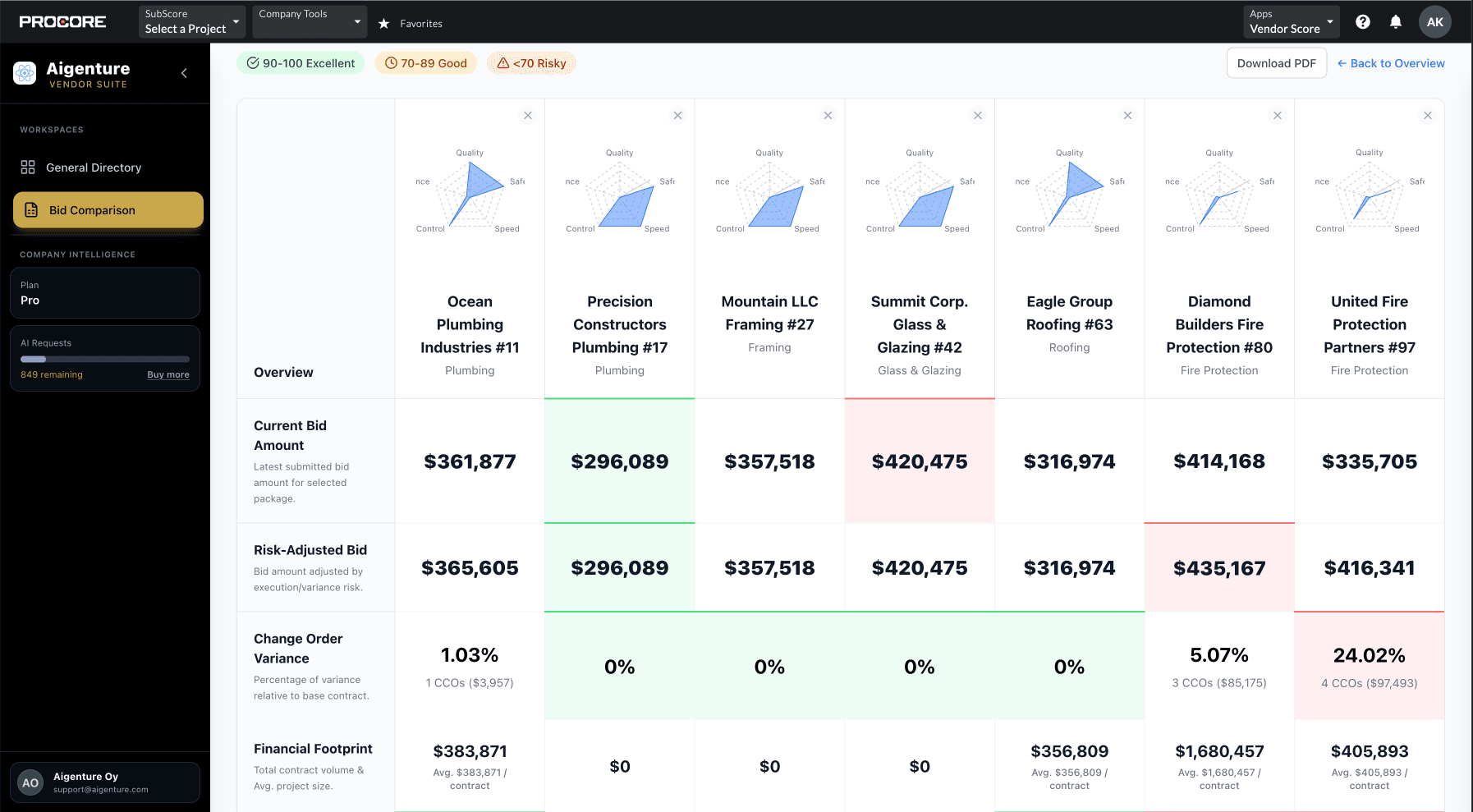
How Aigenture automates bid leveling inside Procore
Aigenture was built to eliminate the need for Excel in the bidding process. It lives directly inside Procore, so you never have to export data or manage separate files.
With Aigenture, bid evaluations are 10x faster. The AI automatically normalizes subcontractor proposals and presents them in a side-by-side view. You can see price discrepancies and scope gaps instantly.
Aigenture also connects your preconstruction data to the field. It pulls historical performance data from your Procore project history. You can see which subcontractors have a history of quality issues or safety incidents before you award the contract. This turns your bidding process from a simple price comparison into a powerful decision engine.
Conclusion: Faster Decisions, Lower Risk
Excel has served the construction industry for decades, but it is no longer the best tool for the job. The risks of manual data entry, formula errors, and fragmented data are too high. By moving to an automated, AI-powered workflow, you can award contracts faster and with more confidence.
Aigenture helps you stop the manual data entry and start making smarter decisions. Our native Procore integration ensures your bid data is always accurate and accessible. View Plans to see how Aigenture can transform your preconstruction process, or Contact Us to learn more.
References
Panko, R. (2008). "What We Know About Spreadsheet Errors." arXiv.
"Bid Leveling in Construction: Choose The Best Subcontractors." Downtobid.