
Bid day is often the most stressful time for a preconstruction team. Subcontractor proposals arrive in different formats, with varying levels of detail, and often at the very last minute. Trying to compare these bids manually is not just slow, it is risky.
If you are using Procore, you already have a central place for your project data. But simply having the bids in one folder is not enough. You need to normalize them to ensure you are comparing "apples to apples." This process, known as bid leveling, is where most estimators spend hours of manual data entry.
In this guide, we will show you how to move away from manual spreadsheets and automate your Procore bid leveling process.
The Challenges of Manual Bid Leveling in Construction
Most estimators still rely on Excel to compare bids. They open a subcontractor's PDF, find the relevant numbers, and type them into a spreadsheet. This method has several major flaws.
First, it is incredibly time-consuming. When you have ten trades and five bids per trade, you are looking at fifty proposals to manually transcribe. Second, manual entry is prone to errors. A single typo can lead to a massive budget overrun or a missed scope item.
Finally, manual leveling makes it hard to spot scope gaps. One subcontractor might include the cost of a crane, while another excludes it. If you do not catch that discrepancy during the leveling phase, you will likely face a change order later in the project. We have discussed the risks of this approach in our article on why you should avoid Excel for bid comparison.
What is Automated Bid Leveling?
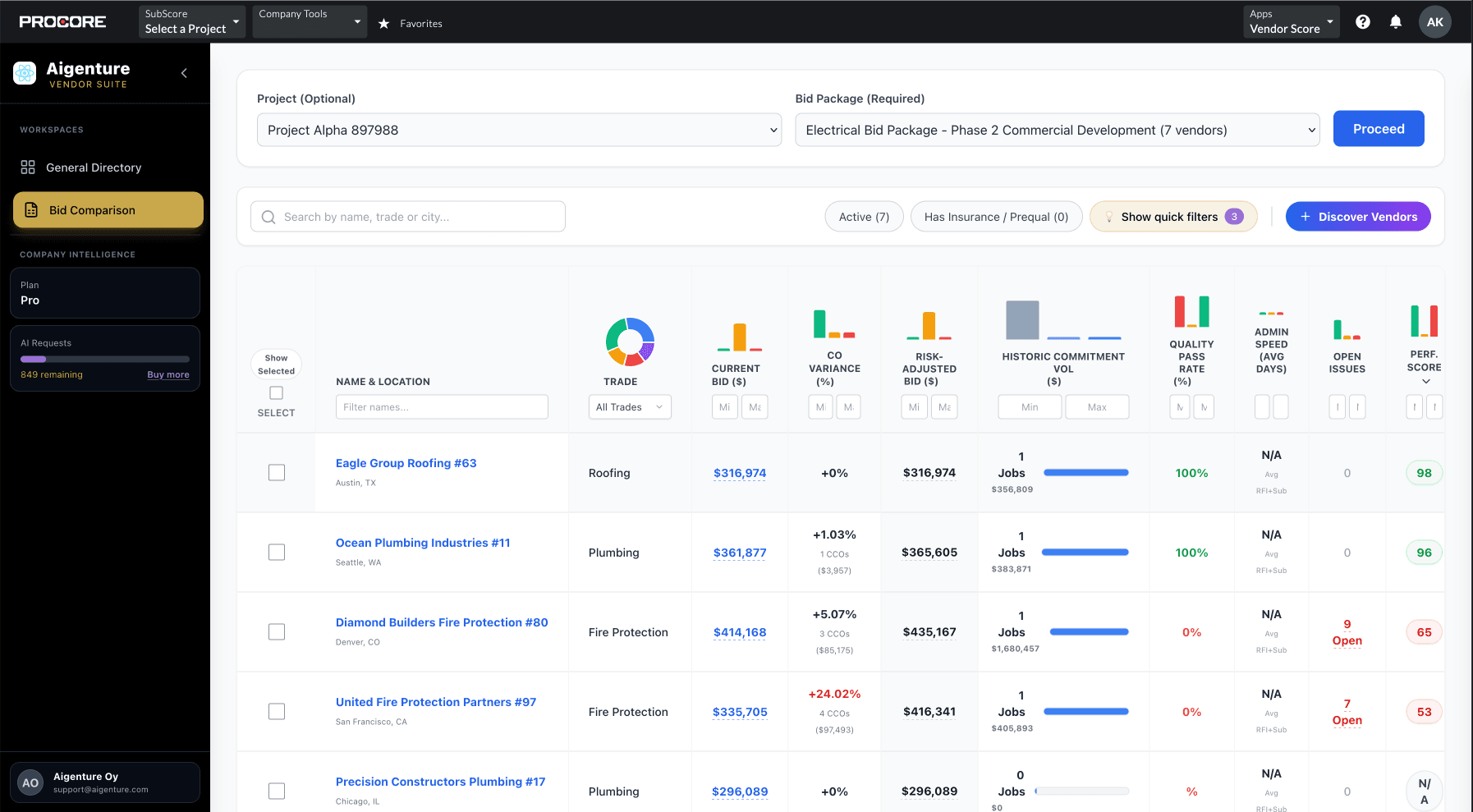
Automated bid leveling uses technology to "read" subcontractor proposals and organize the data for you. Instead of typing numbers into a grid, the software extracts line items, quantities, and prices directly from the PDF files.
The goal is bid normalization. This means the system takes non-standardized quotes and maps them to your specific cost codes or bid packages. This allows you to see exactly where one subcontractor is higher or lower than another on a specific line item.
Research by Smith and colleagues (2025) in their study "Generative AI in Procurement: Rethinking Bid Evaluation" found that AI-assisted models can significantly enhance transparency and fairness by reducing the subjective bias often found in manual assessments. By automating the data extraction, estimators can focus on making decisions rather than just moving data from one screen to another.
How to Automate Bid Leveling Inside Procore
Procore offers native bidding tools that help organize the process. You can create bid packages, invite subcontractors, and receive proposals all in one place. However, the actual "leveling" often still requires a lot of manual work unless you use an integrated AI layer.
Here is how the automated workflow looks when you use a tool like Aigenture natively inside Procore:
- Set up your Bid Package: Create your scope of work and cost codes in Procore as you normally would.
- Receive Proposals: Subcontractors upload their bids directly to the Procore bidding module.
- Automatic Extraction: The AI scans the uploaded PDFs. It identifies the total price, line item breakdowns, and even exclusions or inclusions.
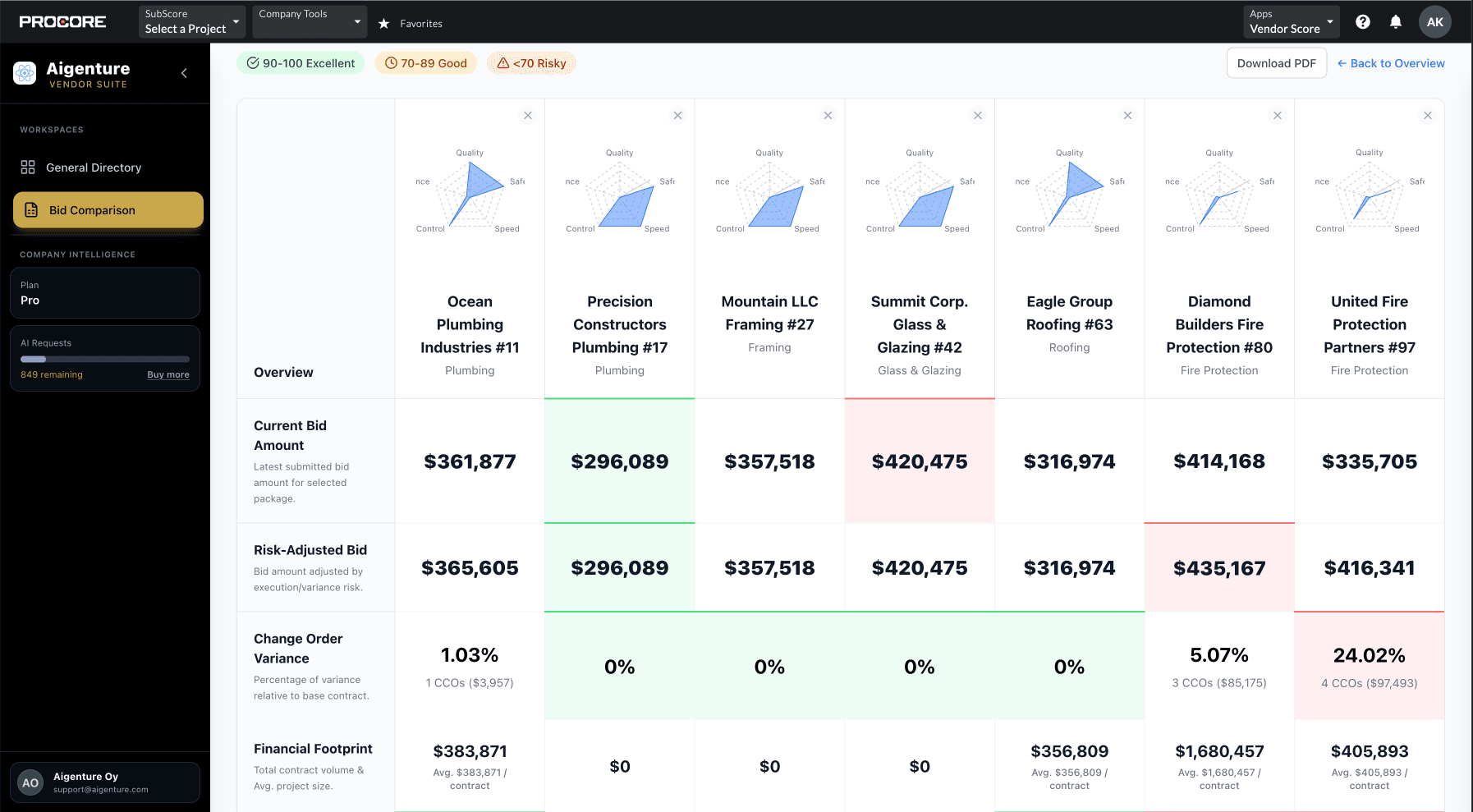
- Side-by-Side Comparison: The system generates a comparison matrix. It highlights outliers where a price is significantly higher or lower than the average.
- Identify Scope Gaps: The AI flags items that appear in some bids but are missing in others. This lets you ask the subcontractor for clarification before you award the contract.
Key Features to Look for in a Bid Leveling Tool
If you are looking to upgrade your preconstruction workflow, not all tools are created equal. As a recent industry report on Procore's official bidding features highlights, the best tools focus on creating "apples-to-apples" comparisons while reducing manual data entry.
When evaluating a solution, look for these features:
Direct Procore Integration
You should not have to export your data to a different website. The best tools live directly inside your Procore tabs. This keeps your "single source of truth" intact and ensures that once a bid is leveled, you can convert it to a commitment with one click. You can learn more about this in our Procore bid management guide.
Automated Scope Gap Detection
The tool should do more than just add up numbers. It should be smart enough to recognize when a subcontractor has missed a piece of the scope. For example, if the bid package requires "site cleanup" and the subcontractor's proposal excludes it, the AI should flag that immediately.
Historical Performance Data
A low price is great, but not if the subcontractor has a history of poor quality or safety issues. A good leveling tool pulls in historical data from your past Procore projects. It should show you if a vendor frequently submits change orders or fails inspections.
Conclusion: Faster Decisions, Lower Risk
Automating your bid leveling process is about more than just saving time. It is about making better, more informed decisions. When you remove the burden of manual data entry, your estimators can spend their time analyzing risk and negotiating better deals.
By using AI to normalize bids inside Procore, you reduce the chance of missing a critical scope item that could lead to a $50,000 change order later. You also gain the ability to compare vendors based on their actual performance history, not just their initial price.
Aigenture provides these capabilities natively inside your Procore environment. It turns your project history into a decision engine, helping you award contracts 10x faster while significantly lowering your project risk.
Ready to see how automated bid leveling can transform your preconstruction team? Start a 30-day Free Trial or Contact Us to learn more.
References
Smith, J. et al. (2025). "Generative AI in Procurement: Rethinking Bid Evaluation, Fairness and Transparency in Engineering and Construction Contracts." WJARR.
"Procore Bid Management: Level the Field and Pick the Right Partner." Procore.